Teach it the words you use
4 min read
You dictate a prompt, and the one word that matters comes out wrong. Your product name, your repository, the library nobody outside your team has heard of. You fix it by hand, and the next time you dictate it happens again.
This walks you through fixing that permanently - about five minutes, once. The fix covers everywhere you dictate, on DevThrottle's hosted Gateway and on a Gateway you host yourself alike. You need DevThrottle running and a Gateway connected. You do not need a session running, and you do not need your phone.
Open the Dictionary in the Cockpit
Open the Cockpit in your browser and choose Dictionary in the left rail. What you are looking at belongs to your Gateway, not to this browser or this machine - which is the whole point. Teach it here and every Director connected to that Gateway gets it, along with transcription of the voice notes you record on your phone.
Add the word under Vocabulary
Click + add term, type the word the way it should be spelled, and press Enter. It appears as a chip. Add as many as you like before moving on - product names, repository names, the tools you say out loud all day.
These are your canonical spellings - the way you want each term written. A term on this list is not enough on its own: the cleanup pass does not go looking for them, and the next step is what actually gets one corrected.
Tell it the wrong spellings you actually saw
Under Common mistranscriptions, click + add a term to correct and enter the correct spelling. A row appears with a + wrong spelling box beside it. Put in what you really got - if dictation gave you "dev throttle" and "def throttle", add both.
This is the step that does the work. A wrong spelling you have listed is corrected every time it appears, exactly; as DevThrottle ships, a wrong spelling you have not listed is left exactly as you said it. So the moment you catch one, add it here - that is what makes the fix happen at all.
Save
Click Save. The button goes inactive once there is nothing unsaved, which is how you know it took. If you try to leave the page with unsaved edits it stops you and asks first.
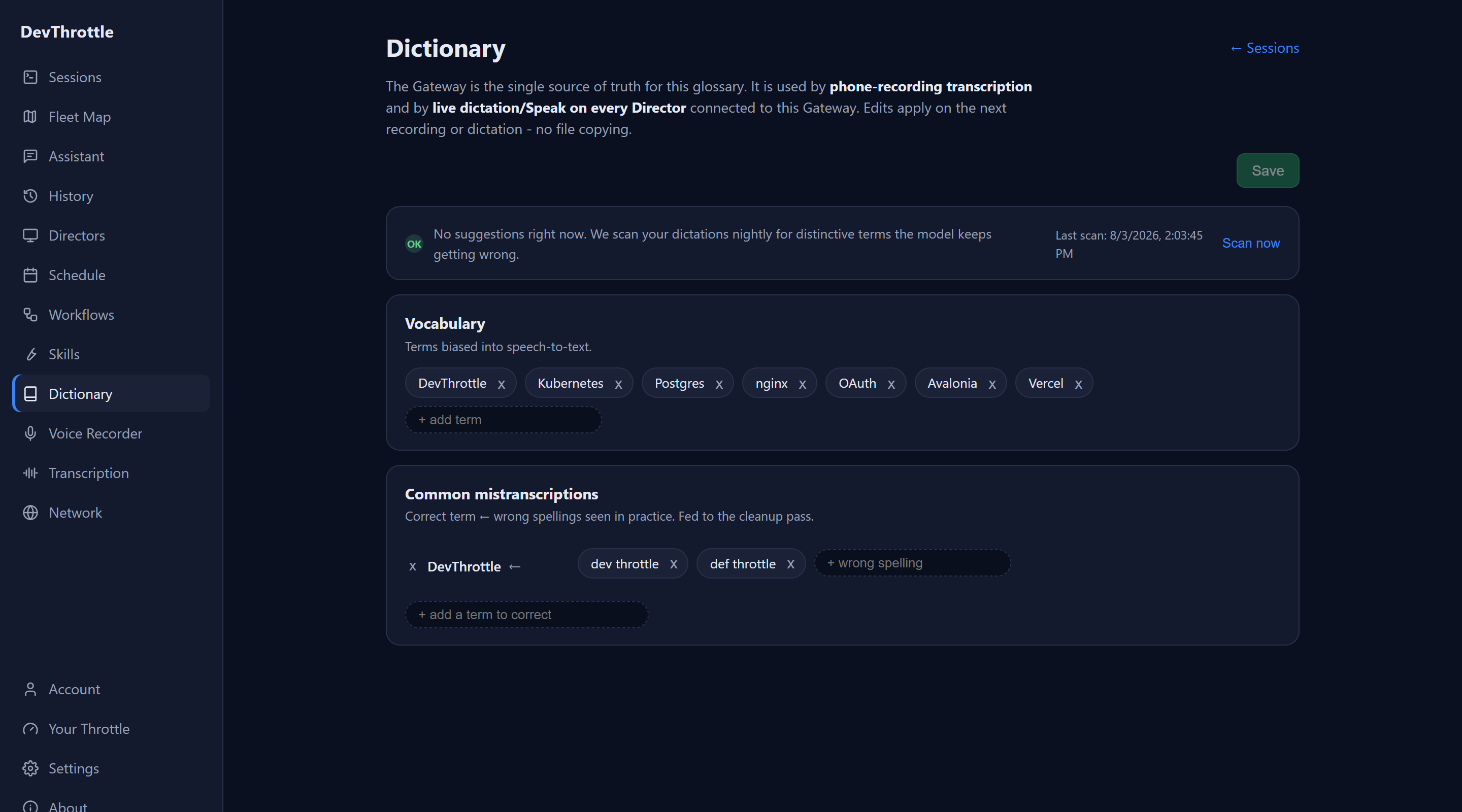
The Cockpit Dictionary page with seven vocabulary chips including DevThrottle and Kubernetes, and a correction row pairing DevThrottle with the wrong spellings dev throttle and def throttle Say it again
Go back to a session and dictate a sentence with the word in it. There is nothing to restart and nothing to copy anywhere - the dictionary is read fresh each time it is used, so the change applies on your very next dictation, and on your next phone voice note transcript too.
What is worth adding
Start with the words you say most and that are least like ordinary English: your product, your repositories, your framework names. Do not try to fill this in one sitting. The useful habit is to add a word the moment it annoys you - by then you know both the right spelling and the wrong one, which is exactly what the two lists want.
Next
For what each list does under the hood, how the cleanup pass is deliberately limited, the one setting that widens what it may change, and what happens if the dictionary is unavailable, see Your dictation dictionary. If you have not tried dictating yet, start with Talk to your agents instead of typing.